Use Status to buy LAND with SNT in Decentraland’s next public auction taking place December 10th, 2018
We are proud to announce a new partnership with Decentraland, supporting the use of SNT in Decentraland's upcoming LAND auction! This partnership represents a growing ecosystem of DApps currently available within Status. Many of these Dapps combine both fun and utility directly within the app, making Status even more robust. This is also a truly connected mobile experience. Users can navigate to Decentraland from within the Status DApp browser and can use SNT within their wallet to bid in an auction.
Decentraland ran their community’s first LAND auction at the beginning of 2018. During that first auction, users spent over 161 million MANA (Decentraland’s ERC20 token) on LAND, equaling roughly $30 million USD at the time.
With over 9,300 remaining LAND parcels left unowned, the Decentraland community has opted to hold a second auction to help distribute this virtual real estate. We’re excited to help share this opportunity with our community.
Decentraland is a virtual reality platform built on top of the Ethereum network. This makes it possible for individuals, brands, and studios to develop rich, interactive 3D content hosted on a decentralized platform.
The 3D space of Decentraland is divided into a finite supply of virtual parcels of land (LAND). Each parcel corresponding to a non-fungible token and Decentraland gives its users full control and ownership of their own digital space, assets, and experiences.
The web, mobile, and VR client allowing users to connect to and view the virtual world is still being built with an intended release date of early 2019. However, Decentraland has an established community of developers already building games and experiences.
This upcoming LAND auction presents lots of exciting opportunities to the Status community, in addition to current members of the Decentraland community. Not only is Decentraland a fun way for people to use and experience crypto, but it’s a real-life use case for the ecosystem. The auction is an excellent way for users to leverage both the DApp browser and wallet within Status.
- 1Easily purchase several adjacent parcels of LAND at once. Buying multiple parcels at the same time can be difficult in the current public market, given the price and demand for LAND. However, by owning multiple, adjacent parcels, you can create Estates, which are larger portions of contiguous LAND that can host more complex 3D content.
- 2Expand your current LAND or Estate holdings. Many LAND holders’ parcels are already adjacent to unowned LAND. The auction makes it possible to purchase that adjacent LAND to add to your already growing holdings.
- 3Find affordable LAND. One of the biggest draws for the auction is the opportunity to purchase LAND at a more affordable price. The Decentraland platform will make it easy to build and share interactive 3D experiences through an open source and decentralized infrastructure. The auction makes it possible to obtain this virtual real estate at prices more accessible to individual enthusiasts, hackers, and artists.
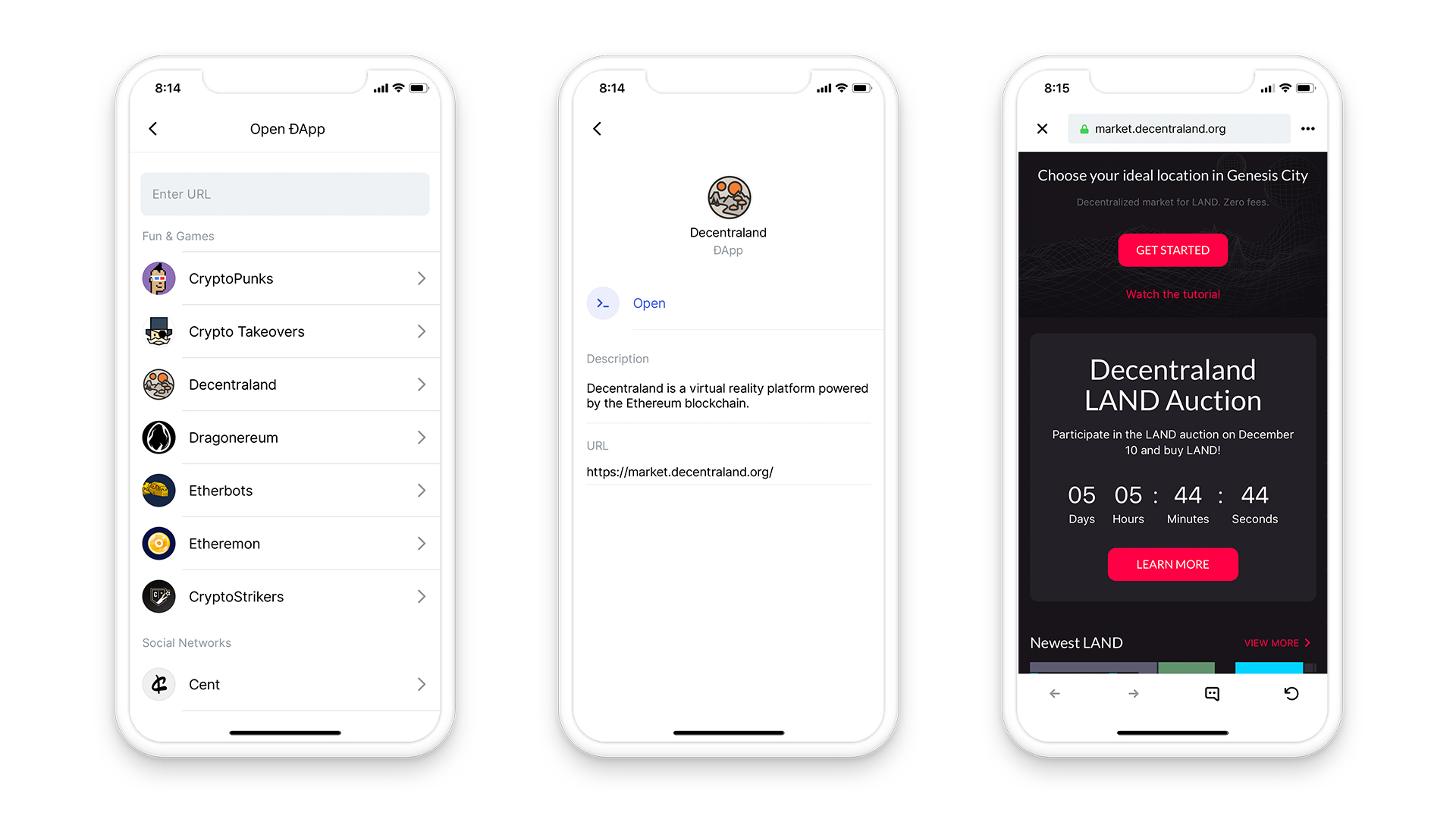
To use SNT to purchase LAND during the auction, open Decentraland within Status by entering market.decentraland.org in the ‘Enter URL” field or simply navigate here. You will be presented with two options – select "Open with Status".
If you have updated Status to the latest release (v0.9.32) you can tap the “+” in the top-right corner. Hit “Open DApp”, and you’ll see Decentraland in the DApp list. Tap Decentraland to launch the DApp.
Since your Status wallet is already connected, you won’t need to sign in. Just tap "Get Started"
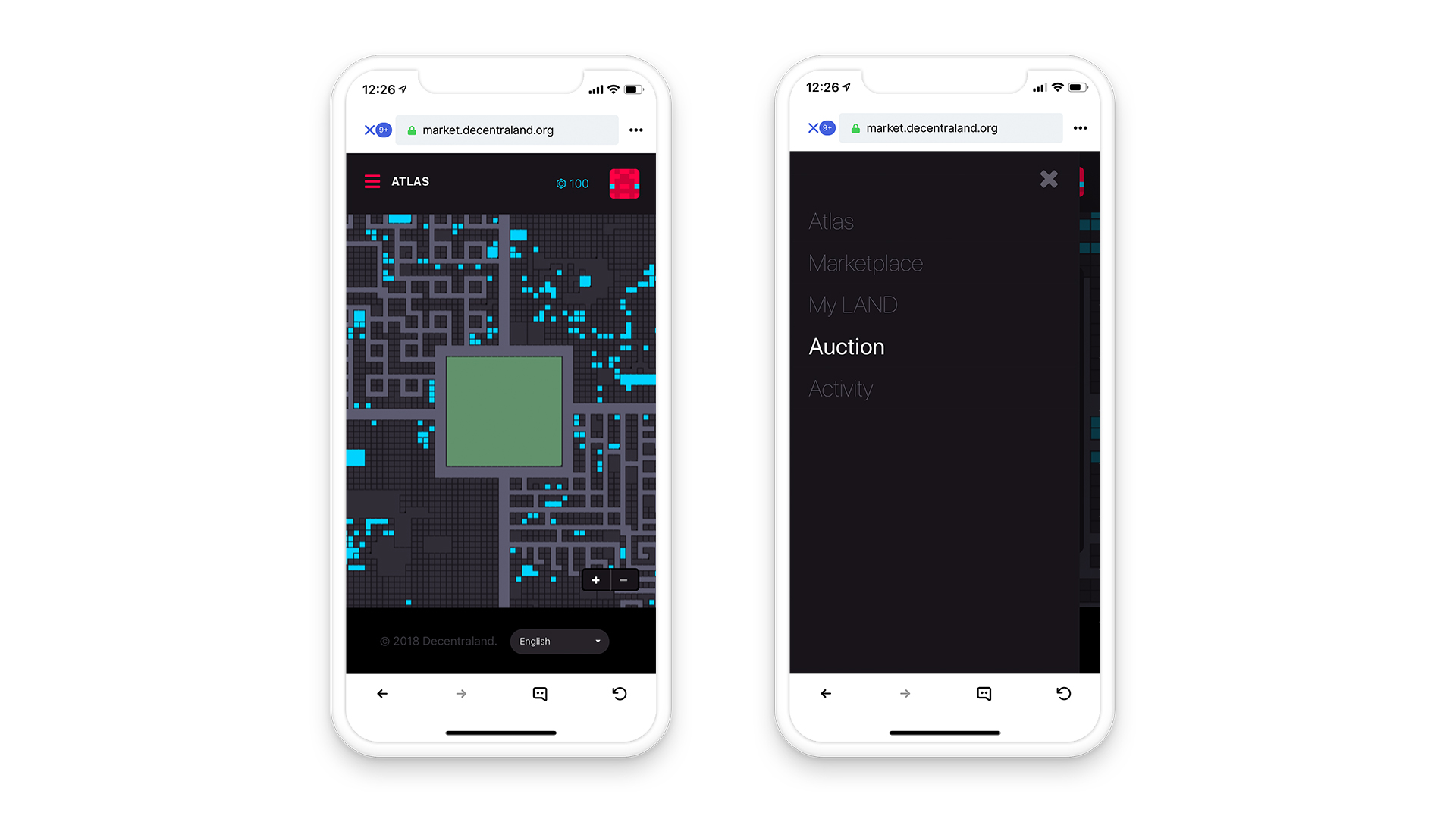
Once you’re connected to your wallet, you’ll be shown a view of the Decentraland Atlas. In the hamburger menu, navigate to "Auction"
From the auction page, you’ll see your LAND Cart. This is where you can select the parcels you want to buy, and the token you want to use to purchase them.
MANA is selected by default, but to purchase parcels using SNT, click the TOKEN menu and select SNT!
With SNT selected as your token, you’ll be shown the price per parcel in SNT, along with the total price in SNT for all parcels added to your cart. You can also use MANA to purchase LAND if you choose.
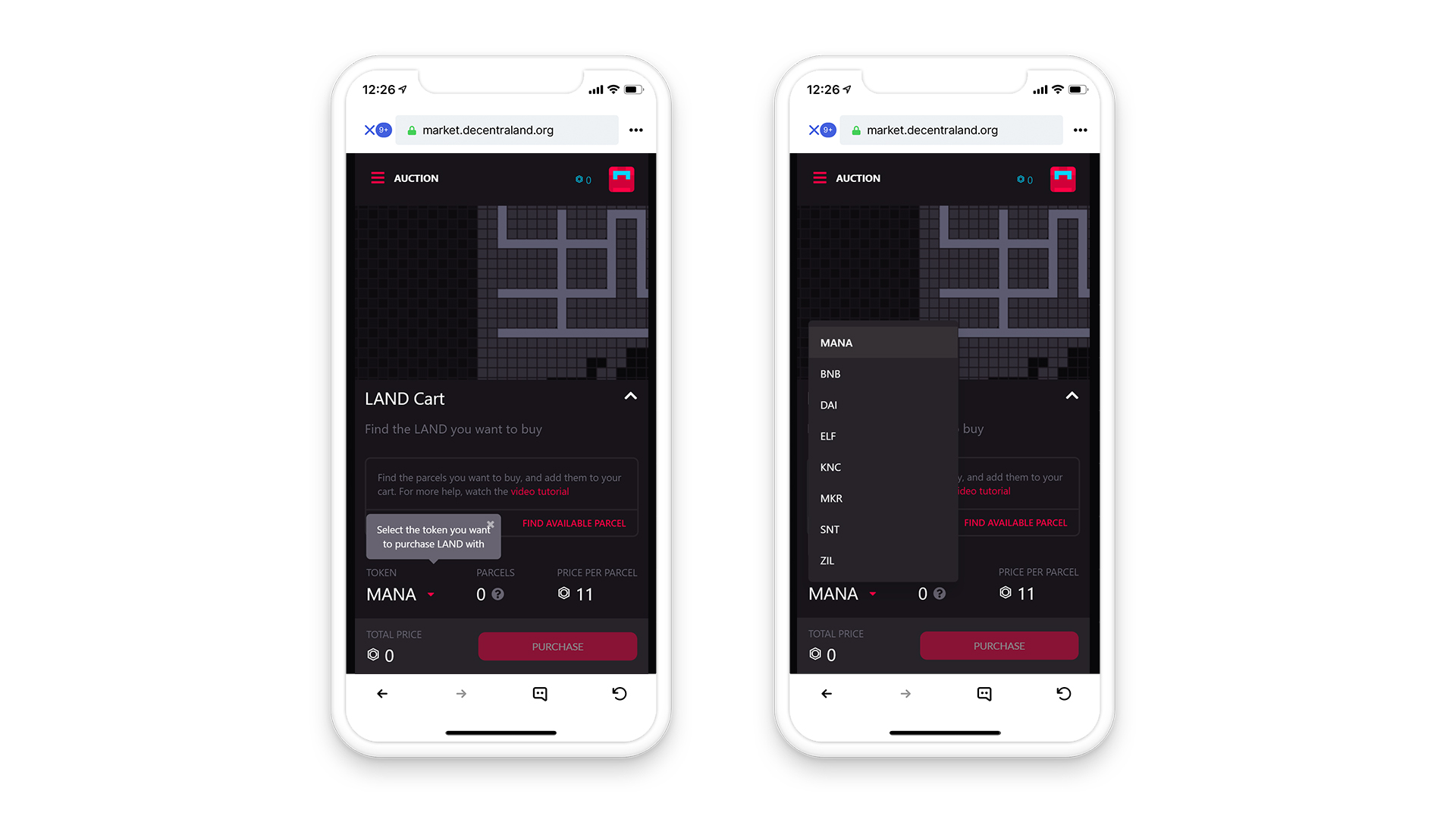
For a visual, step-by-step guide explaining how to get up and running with the Decentraland LAND Auction, see our Mobile Auction Tutorial and Desktop Auction Tutorial.
Payment with other tokens is also possible with Kyber Network integration. This is thanks to a great collaboration between the three projects, ensuring that your transaction is simple and easy.
If you don’t currently have Status installed, iOS ysers can access via TestFlight here: https://testflight.apple.com/join/J8EuJmey.
Android users can install in the PlayStore
Learn more about Decentraland